
Overview
Role
UX Designer,
Backup and DR team
Team
UXD, UXR, UXW, Product, Engineering from two product teams (Backup & DR, Compute Engine)
Key contributions
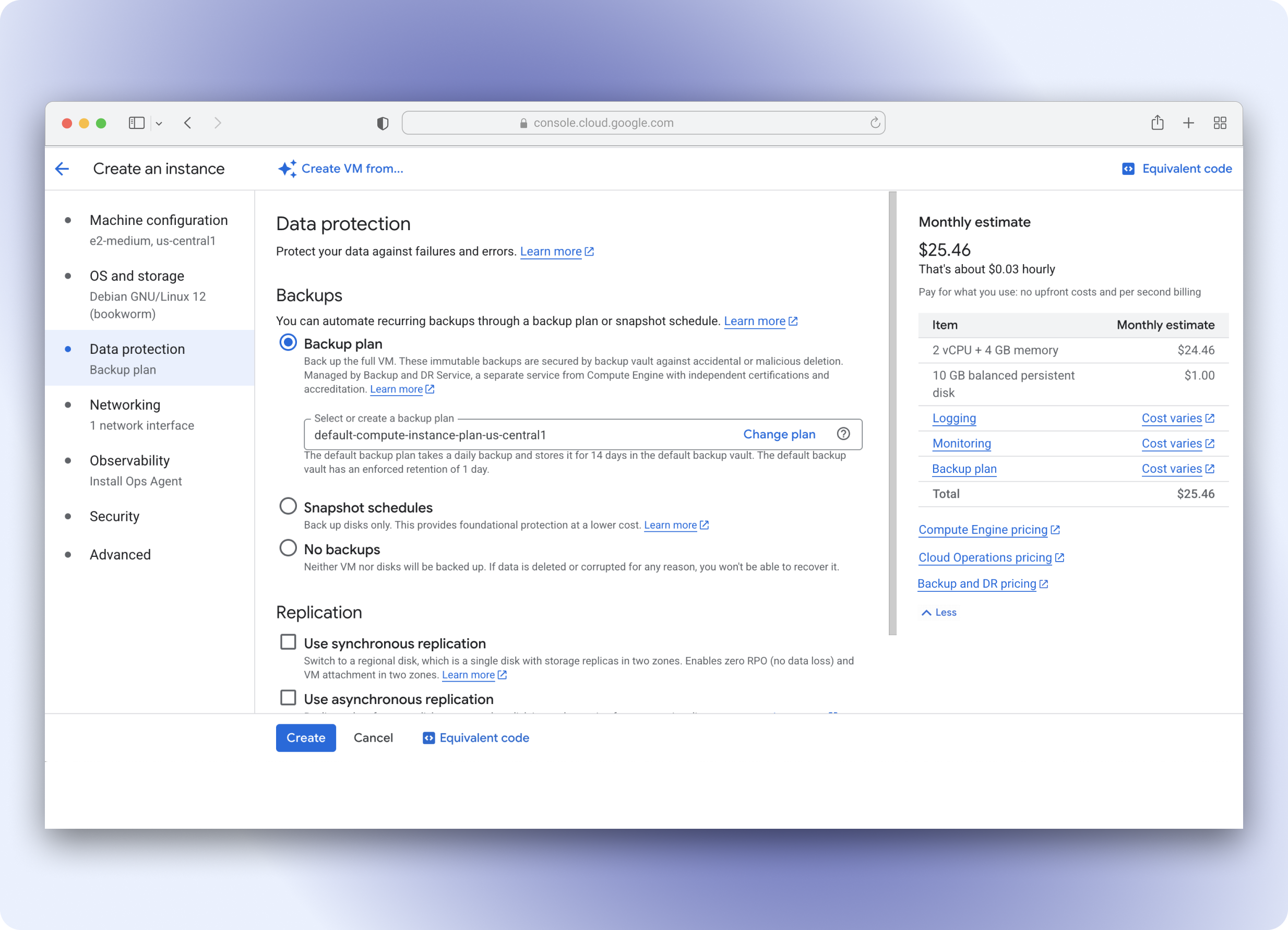
End-to-end designs for how users discover, enable, and manage GCBDR backups within Compute Engine
Context
Enterprises running in the Cloud need to protect critical business data, especially in disaster scenarios such as outages, cyber attacks, and catastrophic user errors in order to prevent significant business disruption or data loss. If they're operating their businesses in countries with strict data protection laws (i.e. GDPR), handling user data safely and having a robust data protection strategy is a minimum requirement.
Google Cloud Backup and DR Service (GCBDR) is a managed backup and recovery service that provides secure backup storage and advanced backup capabilities, enabling enterprises to protect and restore critical data.
This project is launched and publicly available. GCBDR was established as a centralized backup solution that directly integrates with other services (for MVP, we focused on the Compute Engine service).
Within a few months, the launch yielded a 300% increase in GCBDR adoption, primarily from net-new users.
Opportunity
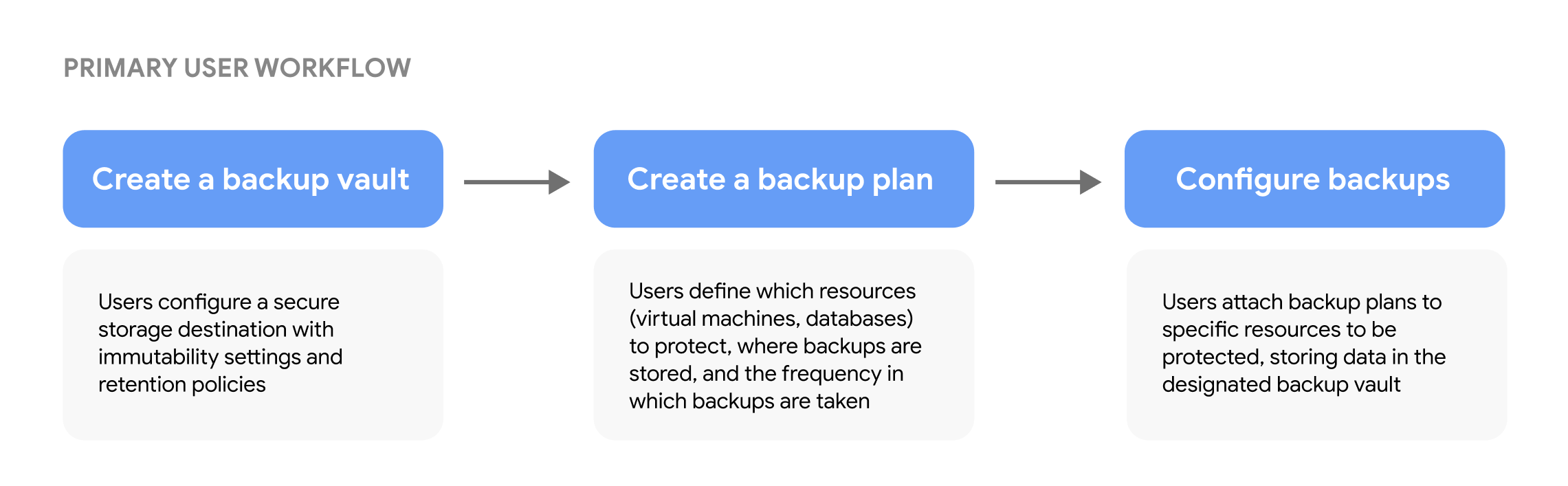
Following this strategic shift, our team focused on providing enterprise customers with a centralized solution for protecting their cloud workloads. The platform should enable users to configure, manage, and monitor backups all from one place. Users create backup plans that define which resources (such as VMs, databases, and applications) to protect and at what frequency.
My contributions focused on the first step and the third step of this key workflow
Challenge
Integrating GCBDR into Compute Engine presented several UX challenges. We needed to introduce a new backup offering in a service with native backup options, while avoiding disruption to established user workflows. This meant that the design had to clearly differentiate backup options and guide users to make informed decisions between backup options without adding cognitive load.
An additional layer of challenge came from GCBDR's complex setup prerequisites (backup plans, backup vaults, and backup schedules). These prerequisites add friction at a critical point in users' VM creation process, making it difficult for users to use GCBDR backups.
Solution
We designed an end-to-end experience of applying backup plans within Compute Engine user journeys. Users can create custom backup plans and backup vaults in GCBDR and then apply those when creating and managing resources from Compute Engine. When selecting a backup option in Compute Engine, users are provided with in-context guidance.
Research
Foundational research was conducted by the UXR team to understand how Compute Engine users think about protecting their Compute Engine VMs.
Key takeaways
- Most users are using "native" backups We learned that most users are using snapshots, which are Compute Engine's built-in backup mechanism, which informed us that there had to be a clear value-add for users to adopt GCBDR as their backup mechanism.
-
- Maintaining the existing workflow is preferable: Users did not want a new backup option to disrupt their workflows within Compute Engine, so the integration must be seamless.
- Different use cases prompt different backup protection strategies: Some users might opt to use GCBDR for business-critical workloads, and Compute Engine snapshots for less risky workloads.
UX Audit
I conducted a heuristic evaluation of the current GCBDR experience to identify usability gaps and areas for improvement. This evaluation assessed key user journeys against Jakob Nielsen's established usability heuristics and highlighted several major findings. Based on these findings, I provided recommendations for each major issue.
- Lack of consistency and standards during backup configuration, due to multiple interfaces that each have unique names/labels.
Recommendation: Reinforce a common language for backups across the platform - Gaps in error prevention makes resolving/troubleshooting specific error scenarios difficult.
Recommendation: Conduct friction logging exercises to gather a full list of error scenarios - Lack of flexibility and efficiency of use during backup policy creation introduces a high learning curve to the product before users can see the value-add.
Recommendation: Provide smart defaults where possible to reduce required user inputs
These insights informed our design approach and helped prioritize which aspects of the experience to address first.
UX Approach
Integrating GCBDR backups into Compute Engine’s interface presented a complex challenge of positioning GCBDR’s comprehensive backup solution within a service that already offers built-in protection options while maintaining a simple, intuitive experience that does not disrupt user workflows.
I worked with UX and product leads across GCBDR and Compute Engine to establish design principles for this integration. Through extensive cross-team collaboration and stakeholder alignment, we jointly defined the following principles that balanced user and business needs, while being scalable across future GCBDR integration projects.
- Express backups as a unified portfolio: Position GCBDR as the centralized backup solution across Google Cloud
- Default to the most secure protection: Reduce cognitive load by selecting GCBDR’s comprehensive backup option with recommended settings by default
- Retain workflow context: Bring backup configuration directly into the Compute Engine console to reduce the need to use multiple interfaces
These principles informed solutions to the following key challenges for this project:
Platform dependencies
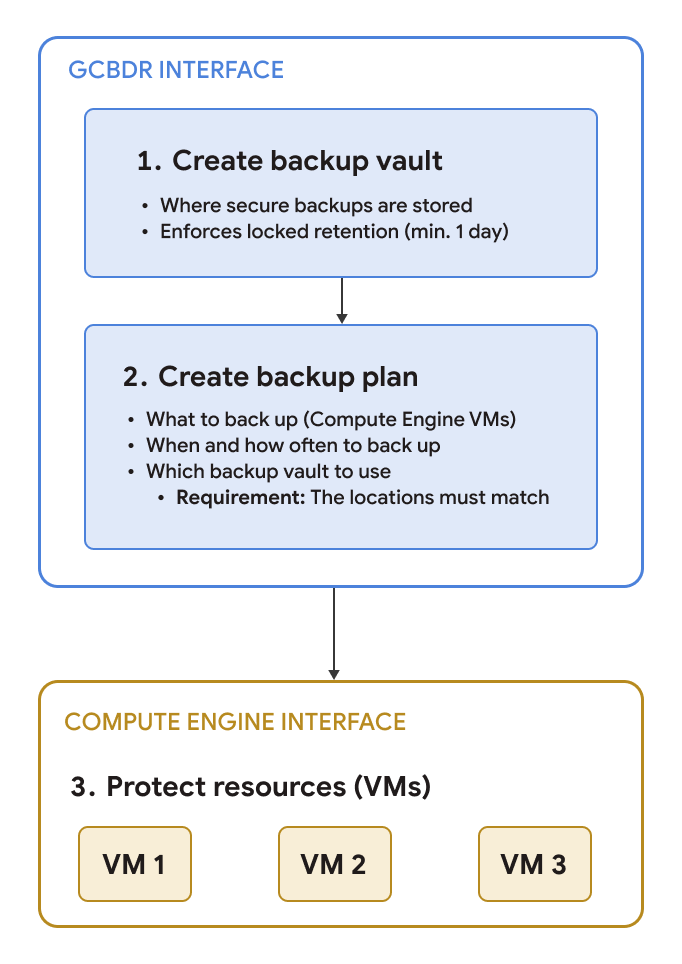
Users need to set up three prerequisites before backing up VMs with GCBDR: a backup plan, backup vault, and backup rules. In the GCBDR interface, the proposed design uses a guided multi-step approach that provided a step-by-step walkthrough for configuring these prerequisites. In the Compute Engine interface, which serves different user roles and jobs-to-be-done, we proposed providing visible default configurations to inform users of what is included.
From the research, we recognized that some users just want to back up their VMs without added complexity of custom configurations. Providing visible defaults simplifies the configuration process while maintaining transparency, as opposed to hidden defaults which would reduce cognitive load.
Differentiating backup options
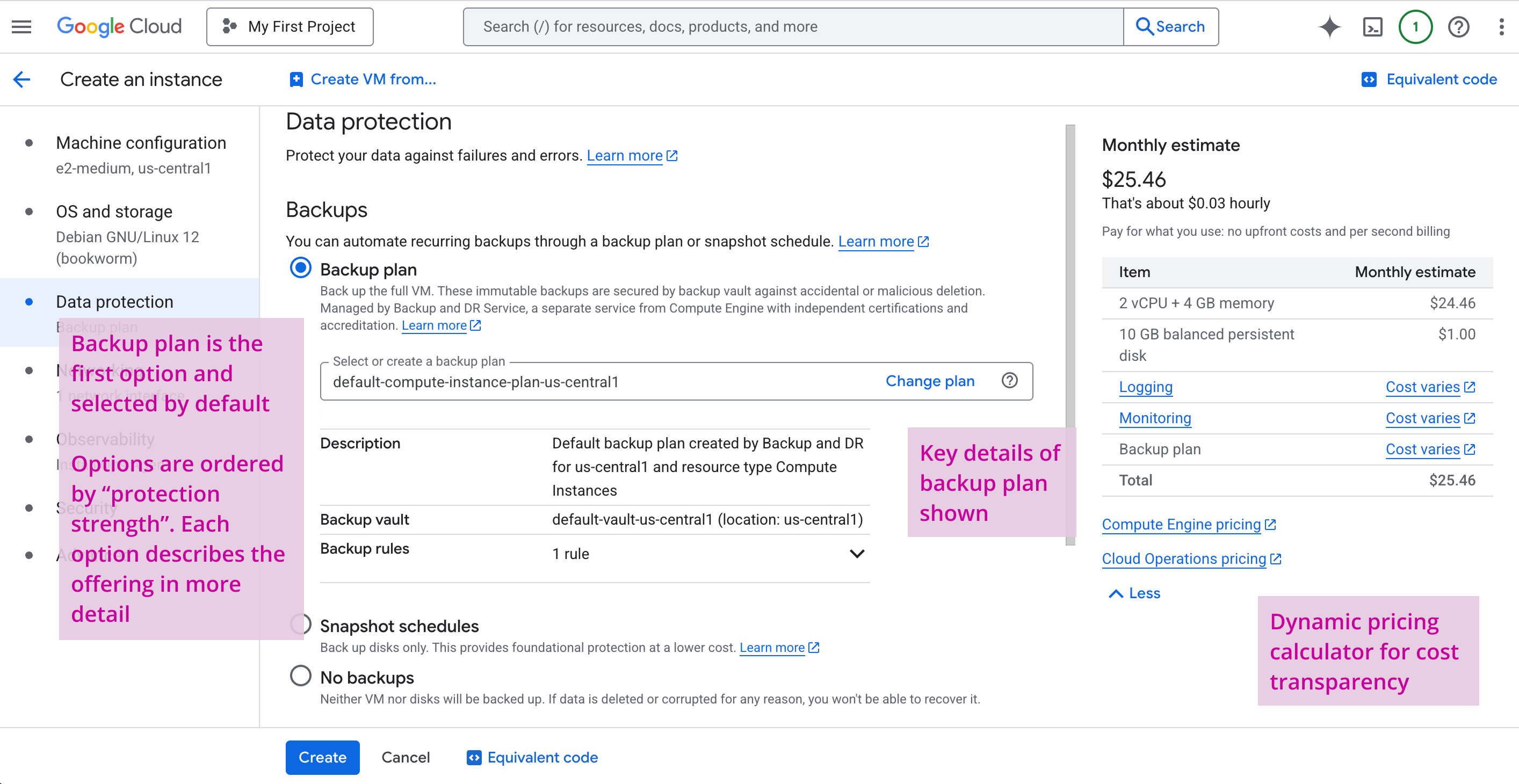
We positioned GCBDR as the comprehensive, horizontal solution through content hierarchy. GCBDR is shown as the first backup option, and is selected by default while using the default backup plan configuration*. To help users choose between options, we provide in-context guidance that highlights what each protects:
- GCBDR backup plans protect the VM, attached disks, and metadata, for full recovery and cross-region disaster recovery use cases.
- Compute Engine snapshots protect VM storage only, for point-in-time disk recovery use cases.
This guidance appears directly in the Compute Engine interface when users are creating VMs, allowing them to make informed decisions without leaving their workflow.

* Since some users might have custom configurations in GCBDR available, we enable users to change the backup plan that will protect the VM (directly from the Compute Engine interface).
Designing for technical constraints
Manual service activation
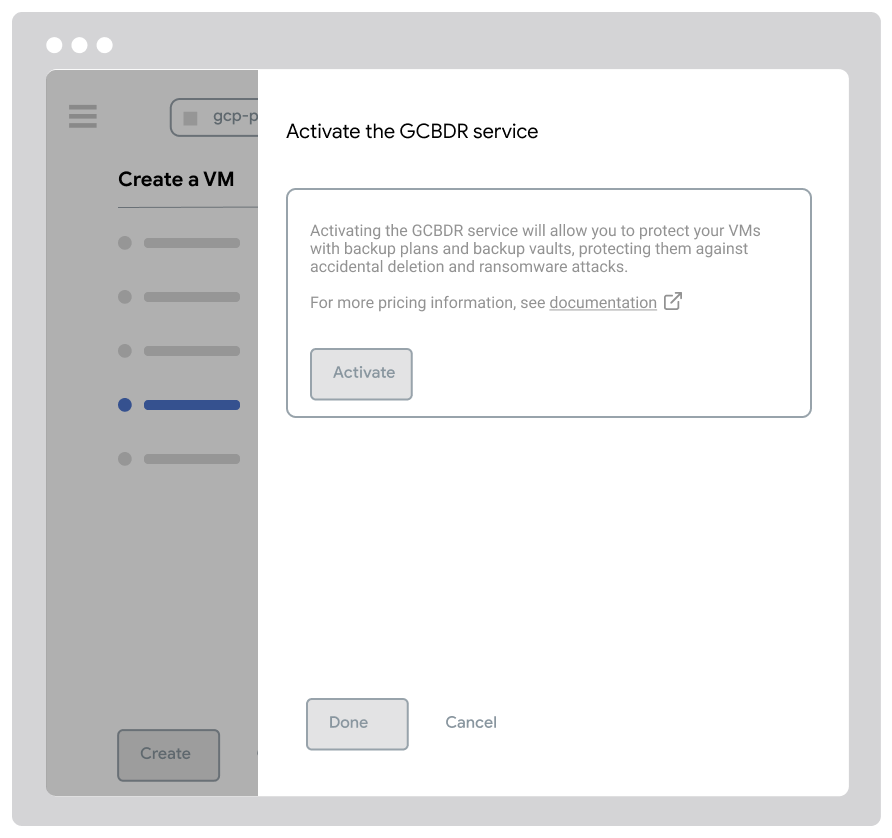
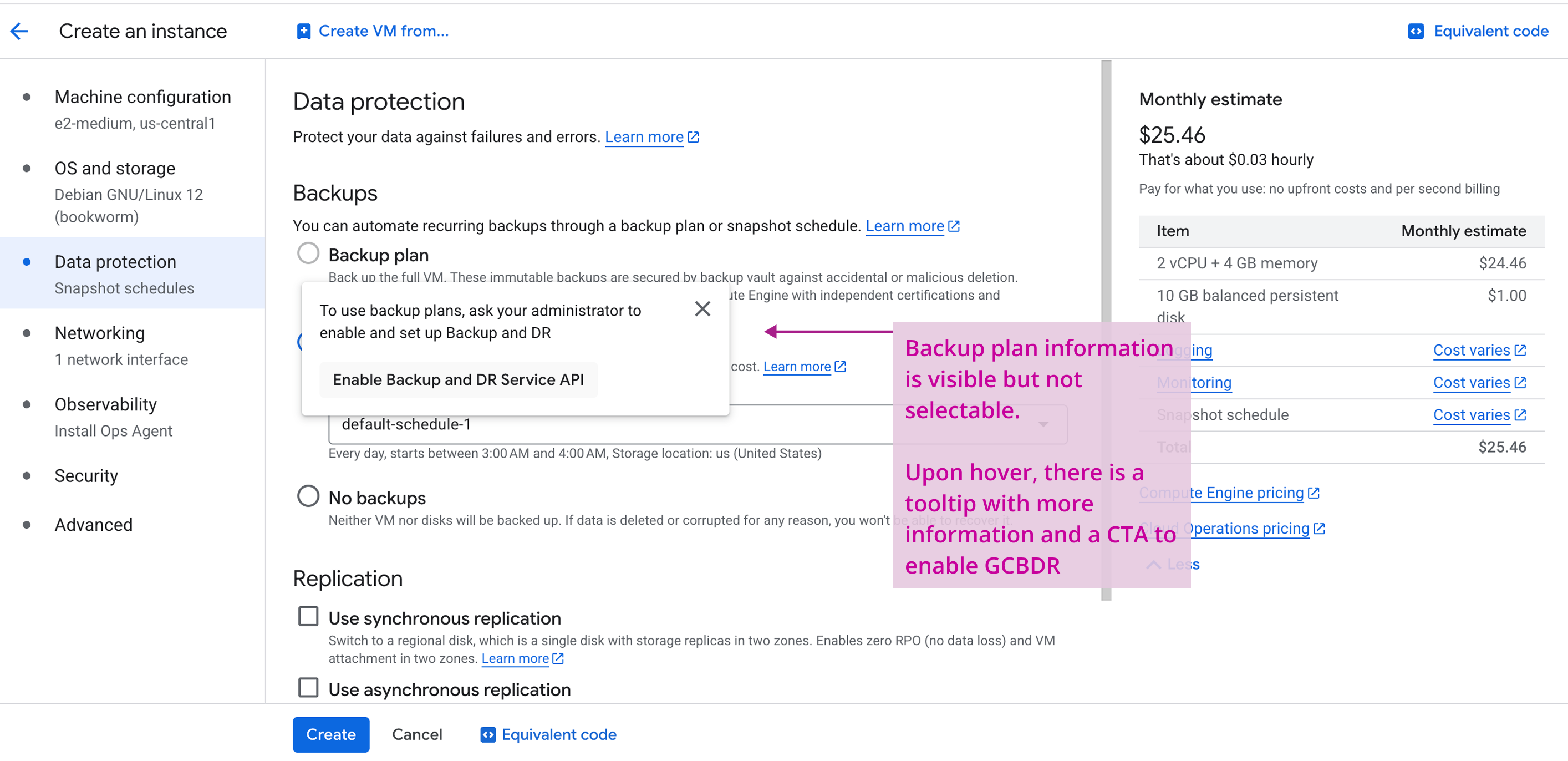
During design reviews, Engineering surfaced a major technical constraint where users must manually activate the GCBDR service before using it. This meant that having GCBDR backup plans selected by default during Compute Engine VM creation was not possible until service activation was complete. This constraint posed a high UX risk to user discoverability and enablement of GCBDR.
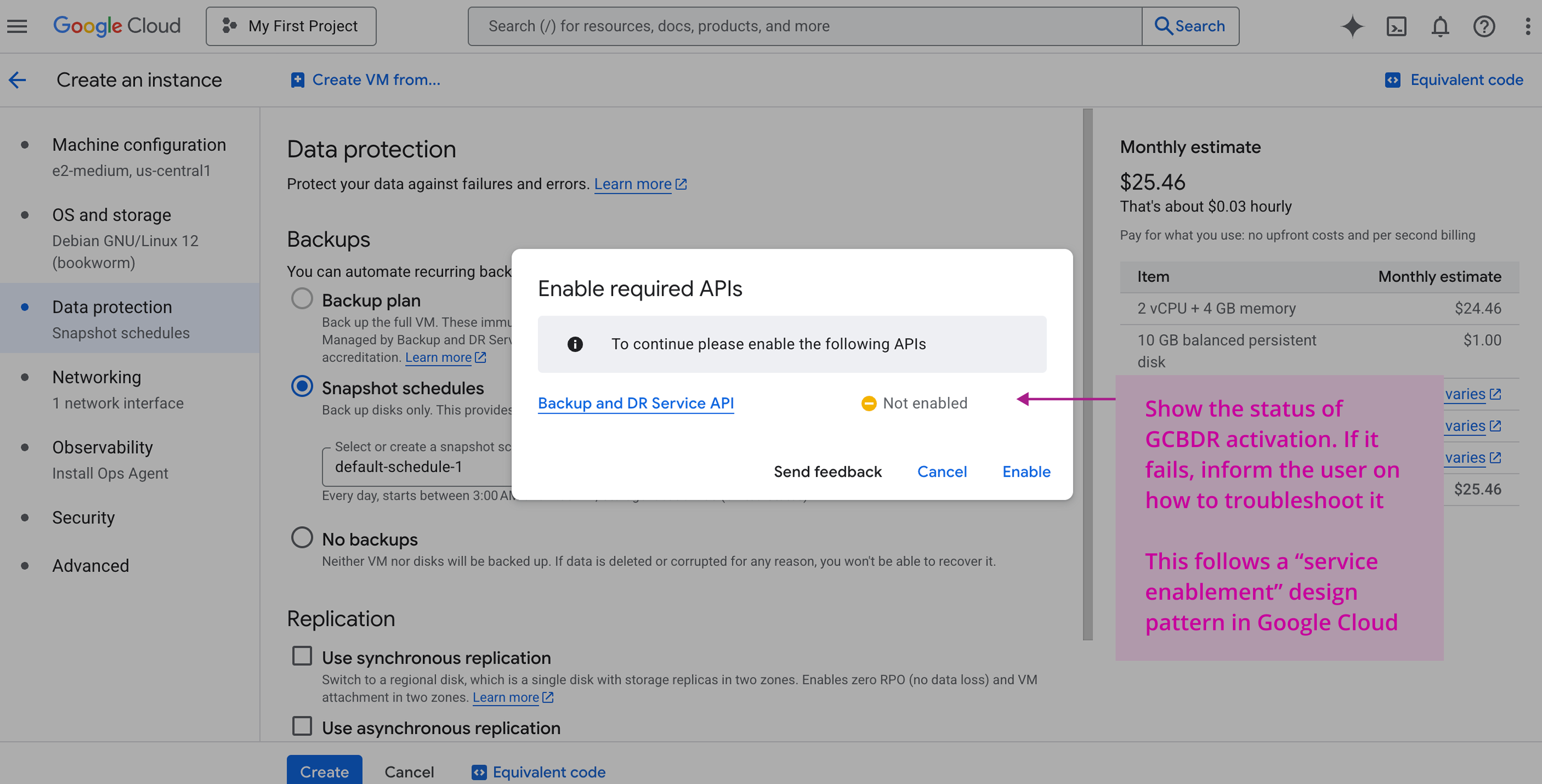
We had to pivot our design approach, since this directly challenged our goal of reducing friction. We explored supporting in-line service activation to allow users to activate GCBDR and use GCBDR backup plans directly within the VM creation flow in Compute Engine. While this added an extra step, it was better than the alternative of requiring users to leave their Compute Engine journey, navigate to GCBDR to activate the service, and go back to Compute Engine while losing their VM configuration inputs.
We opted to disable the backup plan selection, showing the service activation in a tooltip upon hover to maintain our principle of providing transparency. This maintains the in-context guidance to help users differentiate between backup options. The show-on-hover functionality also supports a seamless workflow for users who do not need GCBDR backup plans.

Final Design & Rationale
After Product and Engineering partners signed off on the initial design proposals, we turned these concepts into detailed designs. Given the complexity of designing between multiple interfaces, there were a number of errors and edge cases that we had to account for in the final design. For instance, since there are several prerequisites before a user can successfully back up their Compute Engine VMs using GCBDR, we had to design for error states at each step of the journey.
User flow: Creating a VM
Edge case: When GCBDR is not activated
Golden path: Creating a VM with GCBDR backups configured by default

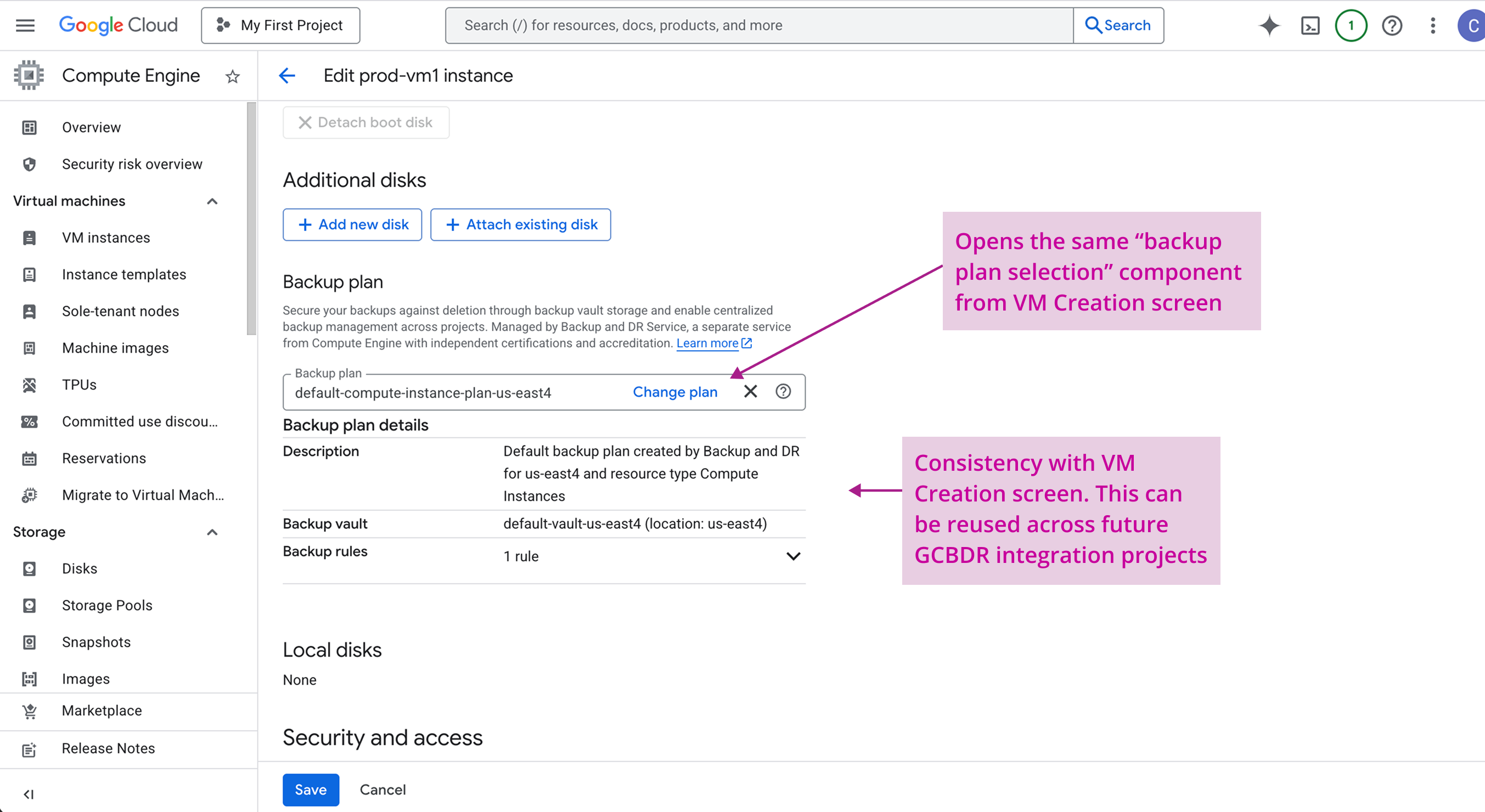
User flow: Editing settings for existing VMs
See the demo below for the end-to-end prototype:
Impact
GCBDR and Compute Engine's platform integration launched for General Availability in under 1 year, and became a key driver in overall GCBDR adoption:
- Compute Engine VMs using GCBDR backup plans increased significantly, with the majority coming from net-new customers.
- GCBDR saw 89% year-over-year growth following this integration.
- Time to back up VMs was greatly reduced by eliminating interaction with multiple interfaces. Users could now protect VMs directly from their workflow in Compute Engine.
The design principles established for this integration scaled to subsequent GCBDR integrations with other services, supporting platform-wide consistency and a unified design language for backups in Google Cloud.
Takeaways
- Get alignment on the broader goal early on in the design process, especially with cross-product collaborations. Because the GCBDR and GCE teams had multiple discussions during project kickoff to converge overall product and UX strategy, we saved a lot of time during the design process and didn't have to revisit too many key decisions that shaped the final designs.
- Establishing scalable design principles for a horizontal product is key. Besides the benefit of maintaining a consistent design language across all integration projects, having scalable design principles can also help other service teams looking to collaborate with GCBDR to understand the product and how to integrate with it.
- Default configurations can significantly simplify complex workflows. By defaulting users to GCBDR's backup plans with pre-configured default settings and resources, we support a seamless experience for users do not need customizations and prefer "out-of-the-box" configurations.
