

Overview
This project was brought from concept to launch within a year, and is publicly available. Following its initial launch, Backup Vault has launched several major feature enhancements.
For MVP, I collaborated with a UX Lead to drive the end-to-end designs for 5 user journeys. I partnered closely with the frontend, backend, and product teams.
For feature enhancements, I was the design lead on several efforts.
Feature enhancements: I led design and UX strategy for several enhancements, including multi-region support and design system alignment.
Motivation
As enterprises run business-critical workloads in the cloud, they face a growing threat of ransomware attacks and accidental deletions that could compromise or destroy their backup data. Backups are critical in scenarios where production data becomes unavailable – if backups can be modified or deleted, organizations cannot safely recover data or ensure business continuity. Therefore, having protected, secure backups are a necessity for enterprises to fulfill their data recovery, security, and compliance requirements in the Cloud.
Opportunity
Google Cloud Backup and DR provides enterprise customers with a centralized solution for protecting their cloud workloads. The platform enables customers to create backup plans that define which resources (such as virtual machines, databases, and applications) to protect and at what frequency.
Core business requirements:
- Build a secure storage mechanism that prevents modification or deletion of backups stored in Google Cloud, to protect data against tampering and malicious or accidental deletion
- Seamlessly incorporate Backup Vault into the core workflow of GCBDR of protecting a Cloud resource.
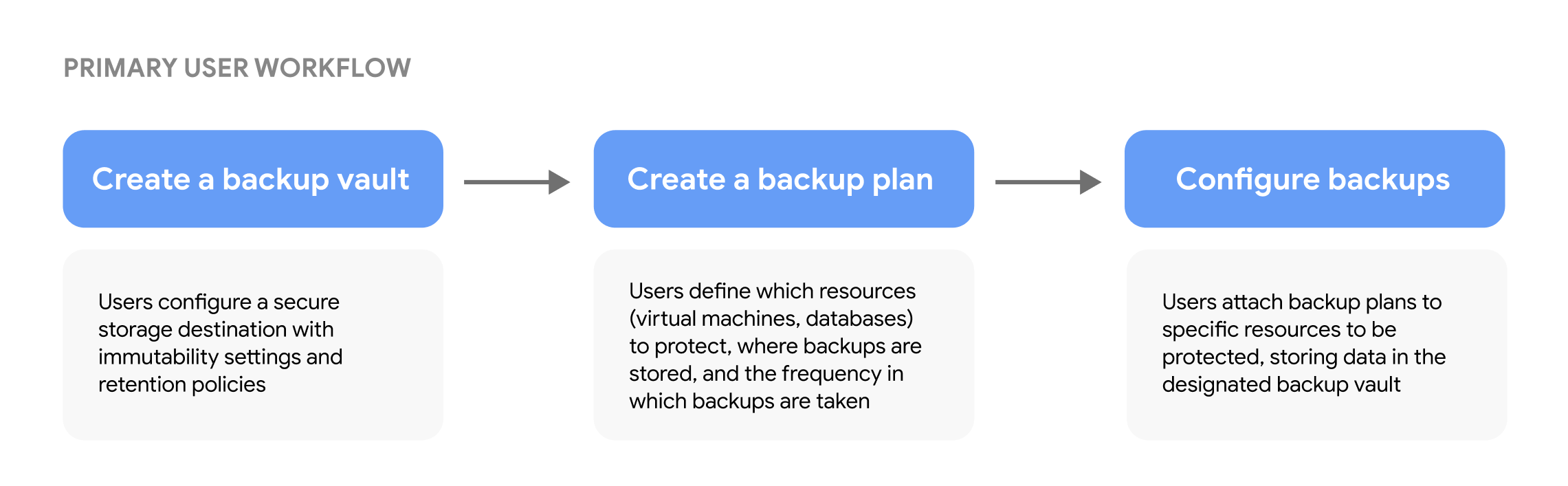
Challenge
How do we empower users to make informed decisions when protecting their backup data, while maintaining an intuitive configuration flow in GCBDR?
Solution
We designed an end-to-end experience for configuring and managing Backup Vault configurations, allowing users to confidently set retention policies and understand protection guarantees for their backups.
Research
Foundational research with enterprise storage users revealed that security was non-negotiable when evaluating backup solutions. Organizations required absolute certainty that backup data could not be modified or accidentally deleted, even by administrators with all-access permissions.
Key takeaways:
- Immutability is mandatory: Users stated that backups must be protected from modification or deletion to defend against ransomware attacks and accidental deletions
- Compliance guarantees: Organizations in regulated industries (healthcare, finance) needed audit trails and retention policies that met regulatory requirements
- Air-tight data recovery: Users needed assurance that backed-up data could be restored to a healthy state. If backups could be compromised, organizations' disaster recovery strategy would fail and have a negative impact on business continuity.
UX strategy
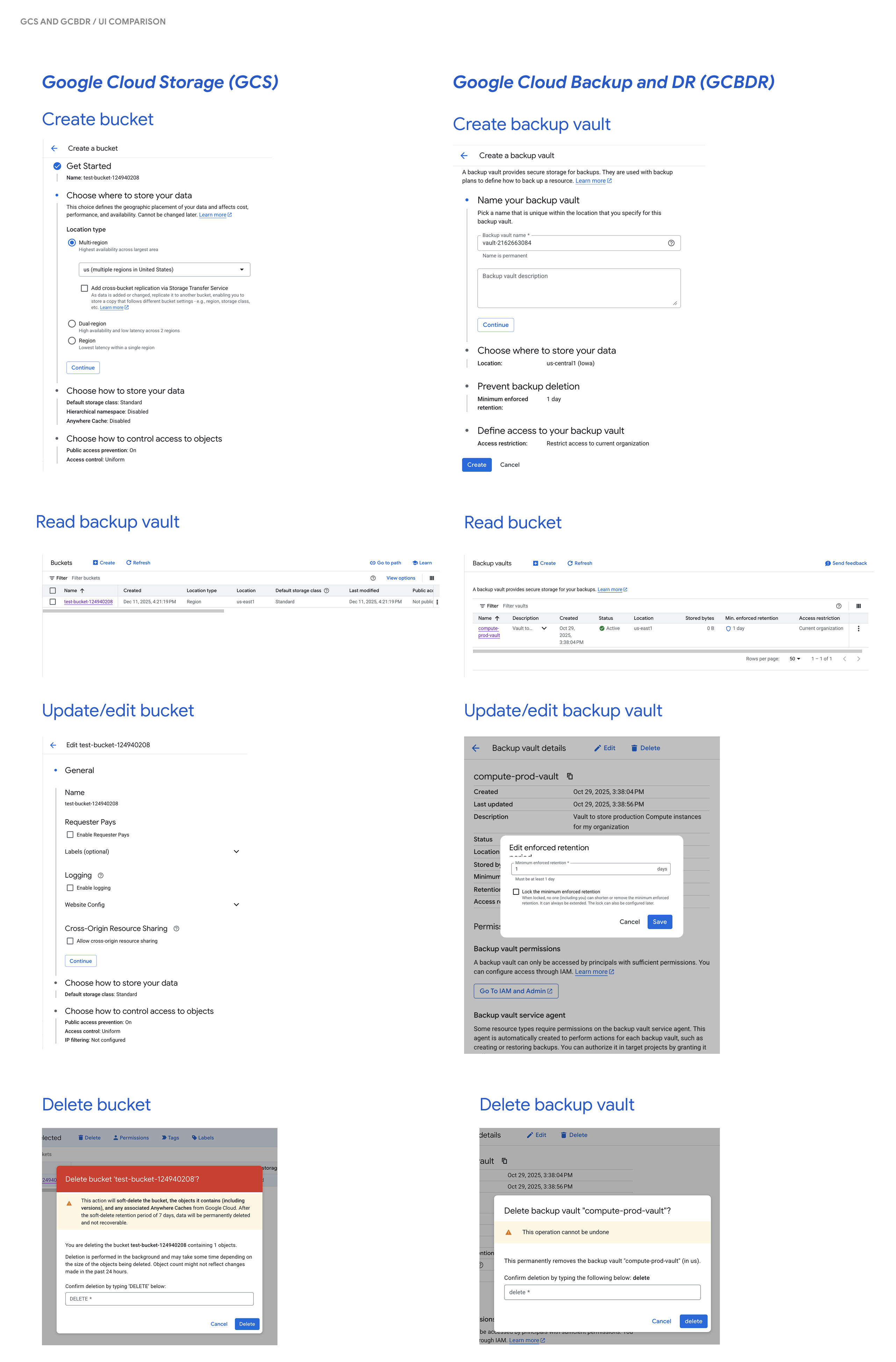
To fully integrate Backup Vault into the broader Google Cloud platform, the overall design direction had to be consistent with standard UX patterns – specifically for CRUD (Create, Read, Update, Delete) operations.
Based on research signals, we incorporated these guidelines to inform our design direction:
- Clear consequence signaling: Users must understand the impact of their configuration choices before they confirm or submit their choices.
- Product-wide consistency: Naming conventions and page layout should be consistent across the product first and foremost, and across the platform as secondary.
Early concepts
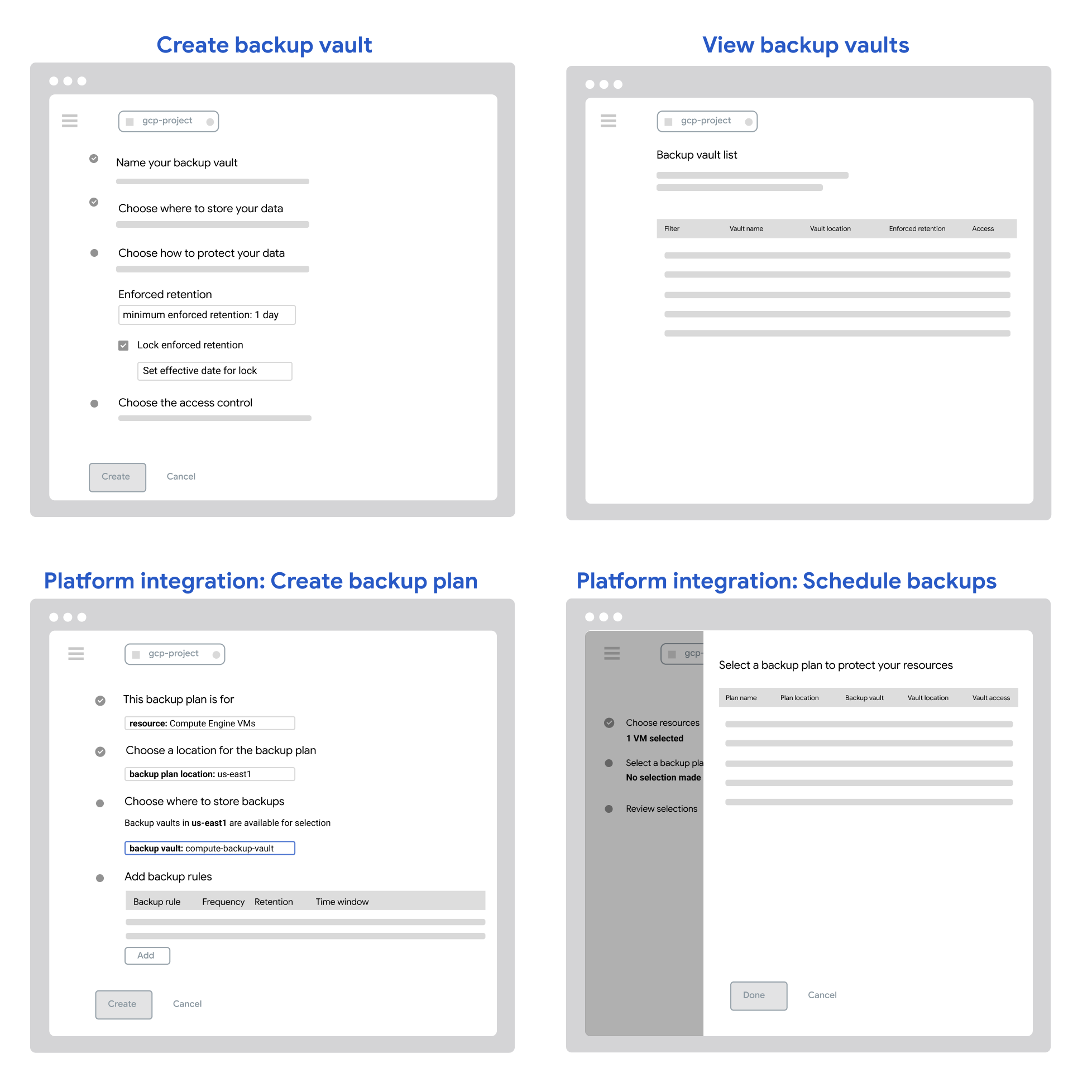
While creating early concept designs, I partnered the designer who was driving the GCBDR platform integration experience to ensure that Backup Vault designs would have a consistent feel throughout the product. For Backup Vault, users would configure all settings upfront including retention policies, encryption settings, access controls, and where data would be stored.
Addressing feedback
These concepts went through multiple UX reviews with cross-functional Engineering and PM partners, and validation with customers through usability testing. Our UXR team leveraged the rapid iterative testing and evaluation (RITE) method with our largest customers and early adopters to evaluate the core GCBDR workflow.
For backup vault, users were able to easily navigate the configuration process due to their existing Google Cloud resource configuration mental models. Specifically, grouping settings under different sections was well received as it helped users structure information in an intuitive way. However, they felt that there was too much information on the page, and were confused about which settings are required or optional during backup vault creation. Since all settings were visible, this added upfront cognitive load where users had to understand all settings before committing to any decisions.
In subsequent iterations, we adapted the approach to address the two points of feedback:
- Have "collapsible" sections, with all sections except the first one collapsed by default. This approach allows users to focus on configuring settings for one section at a time.
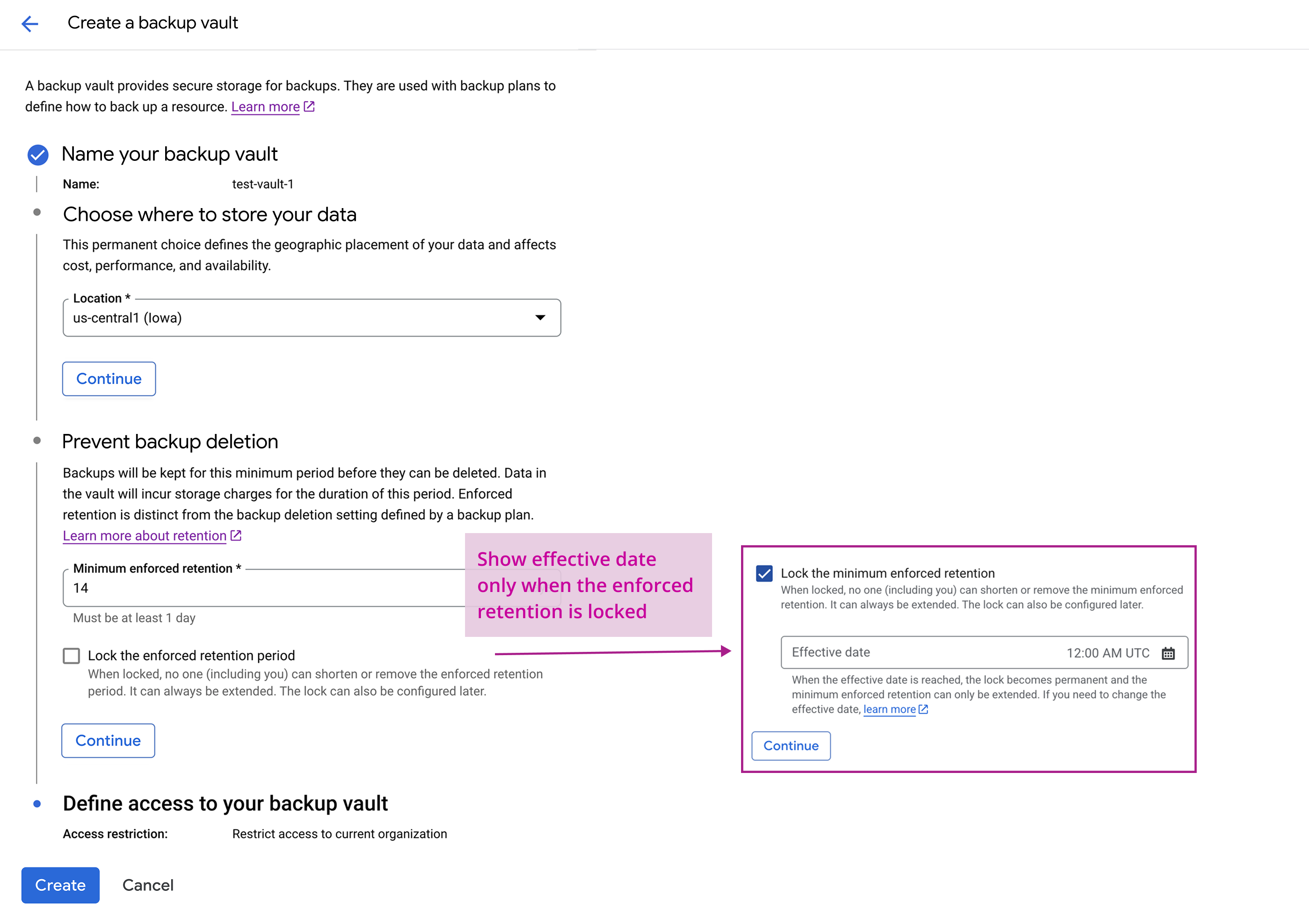
- Show relevant settings based on previous user inputs. For example, only users who want to set a lock on the minimum enforced retention will be faced with the subsequent setting of choosing a date that the lock takes effect. This reduced complexity in the form inputs, and guided users toward valid configurations
MVP Design Solution
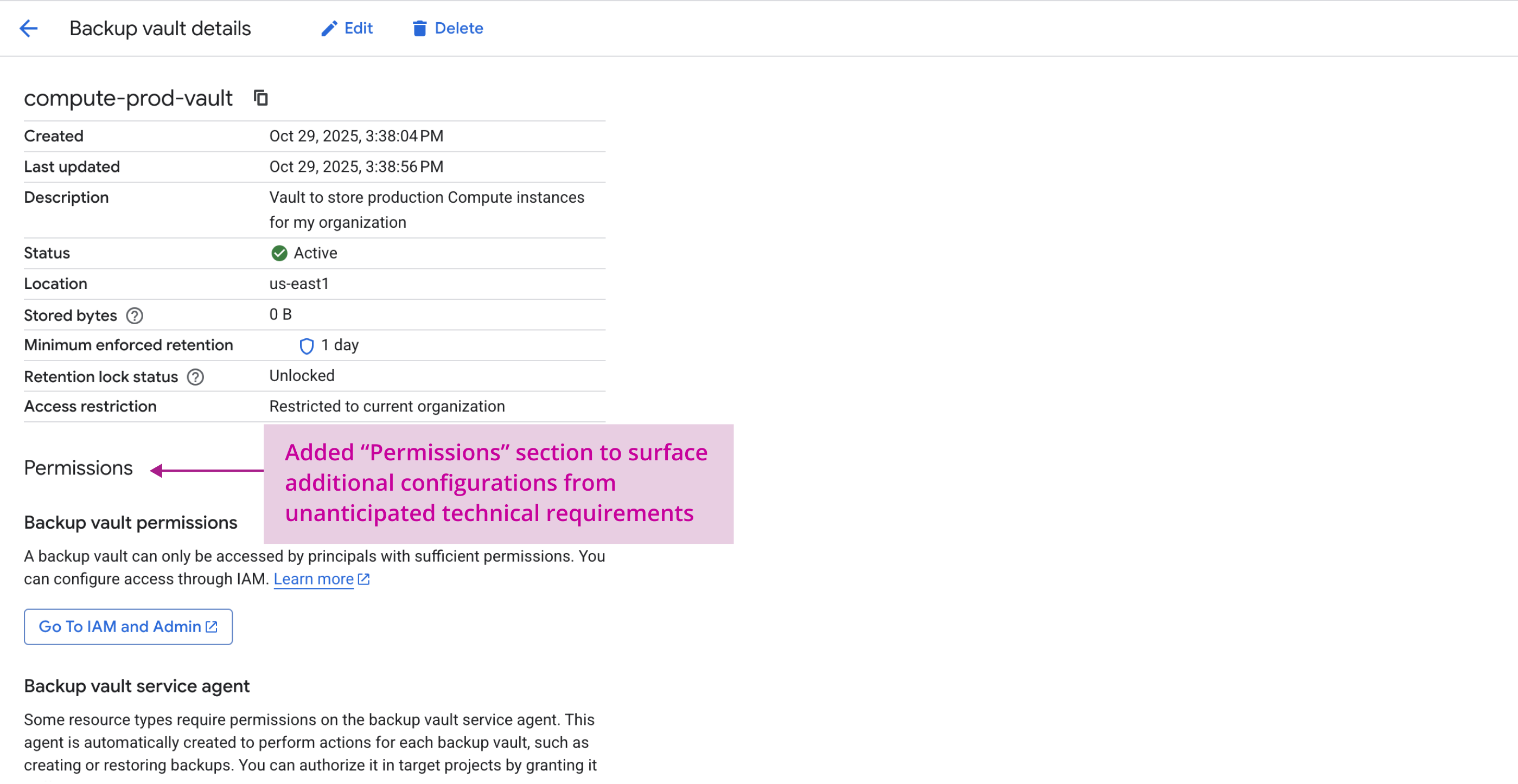
When refining concepts into detailed designs, I collaborated closely with Engineering and Product to better understand error and edge cases that users might encounter, so that the experience can accommodate for those scenarios.
For example, if a user tries to modify a backup before it reaches its effective date, it will result in an error and users will be informed of why. If users are missing permissions to perform operations on a vault, the actions will be disabled and users will be guided to acquire the missing permission.
Platform-wide consistency
For the CRUD operation user journeys, the foundational experience was designed to mirror other products. Below is a side-by-side of CRUD operations for buckets in GCS and our proposed designs for backup vaults in GCBDR.
MVP designs & rationale

Post-MVP enhancement: Multi-region support
Motivation
Following the MVP launch, where backups stored in a single region were supported, the team prioritized the effort to support multi-region backups. Multi-region support is a critical part of a Cloud disaster recovery strategy for data availability during regional outages and adherence to data compliance regulations. It was the top customer ask when Backup Vault was announced.
Challenge
Introducing multi-region backup support meant that the design had to balance a information-heavy surface while maintaining simplicity in the configuration. Users must understand compatibility constraints, pricing differences, and appropriate use cases to make informed decisions, but surfacing these details risked adding cognitive load to an already complex configuration process.
Solution
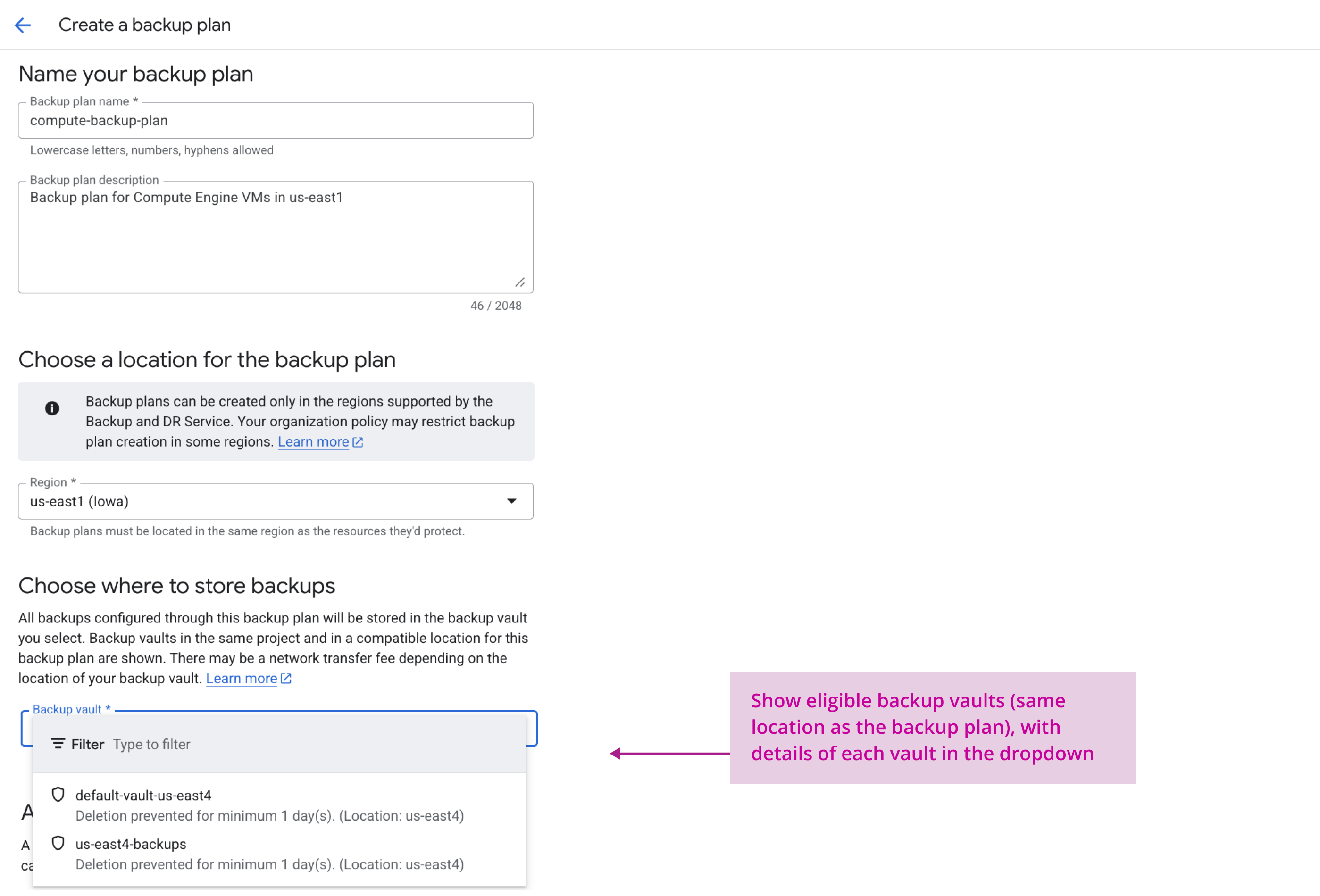
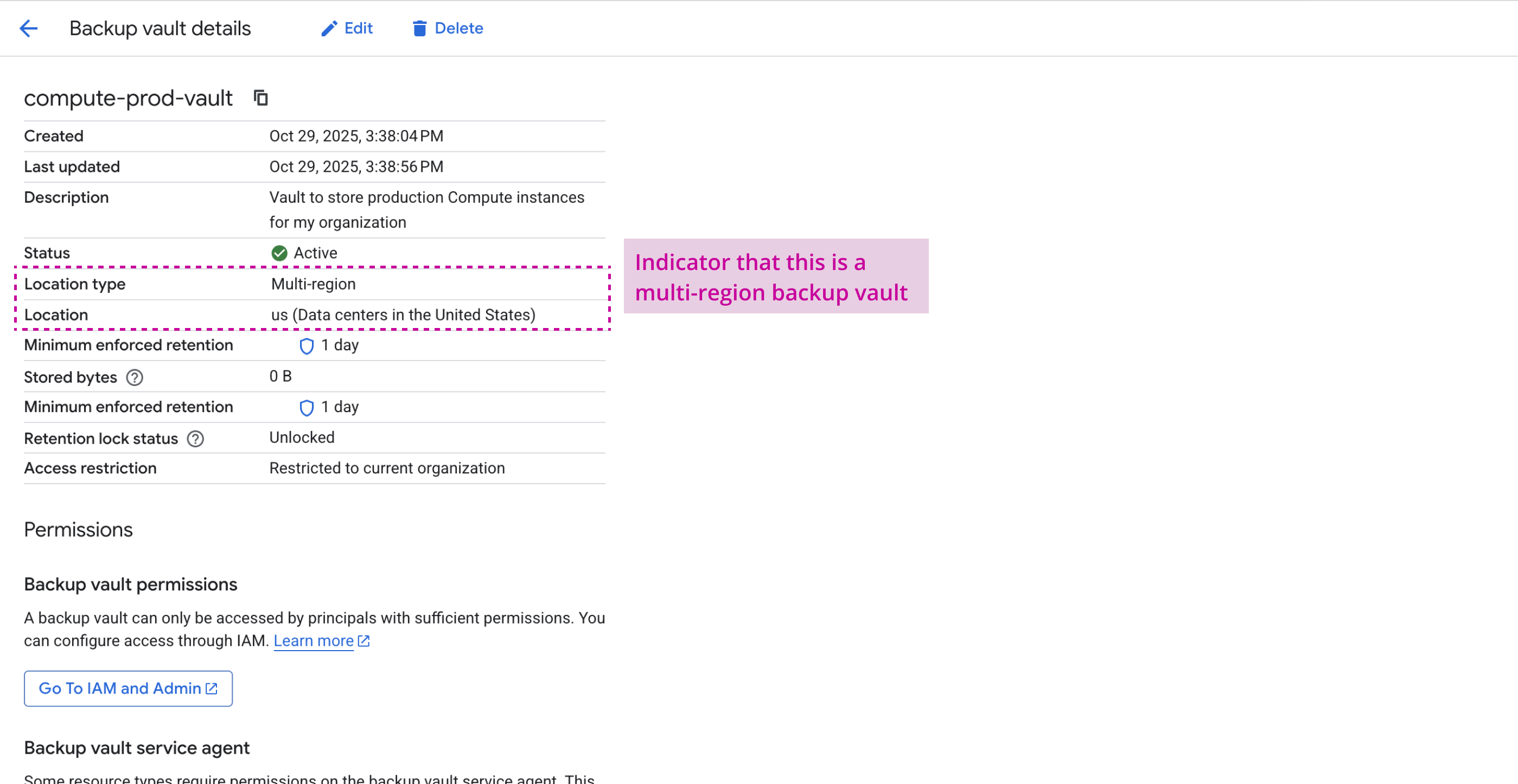
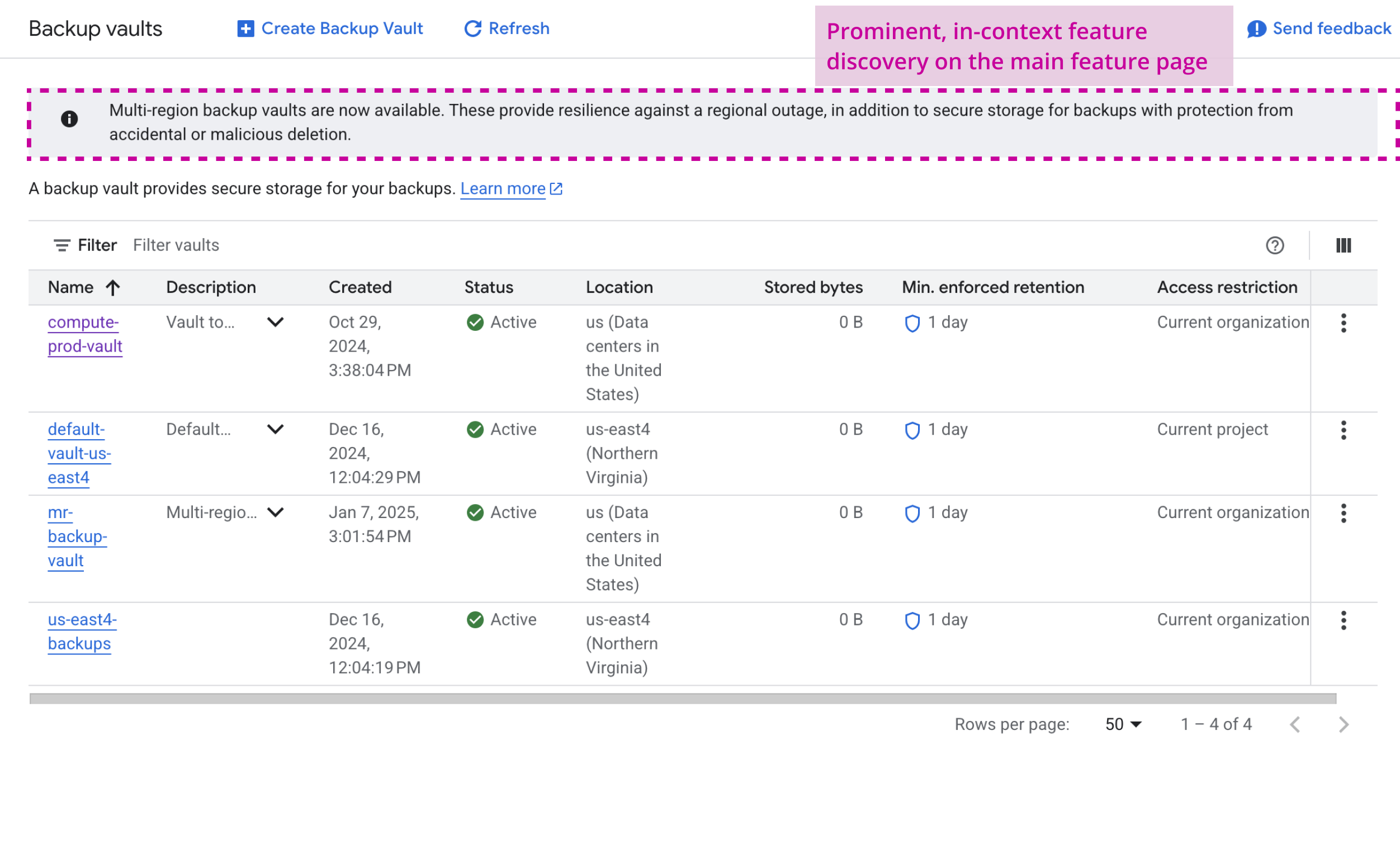
I designed an end-to-end experience that introduces multi-region backup as a new configuration setting, with contextual guidance that helps users determine where to store their backups.
Technical considerations
There were a few technical considerations that the design had to accommodate. Google Cloud supports three multi-region options: US, EU, and Asia. Each distributes your data across multiple data centers within that location. When setting up backups, the backup vault location must be compatible with the backup plan location. A backup plan in any US region (e.g. "us-east1" can use a vault configured for the broader "US" multi-region).
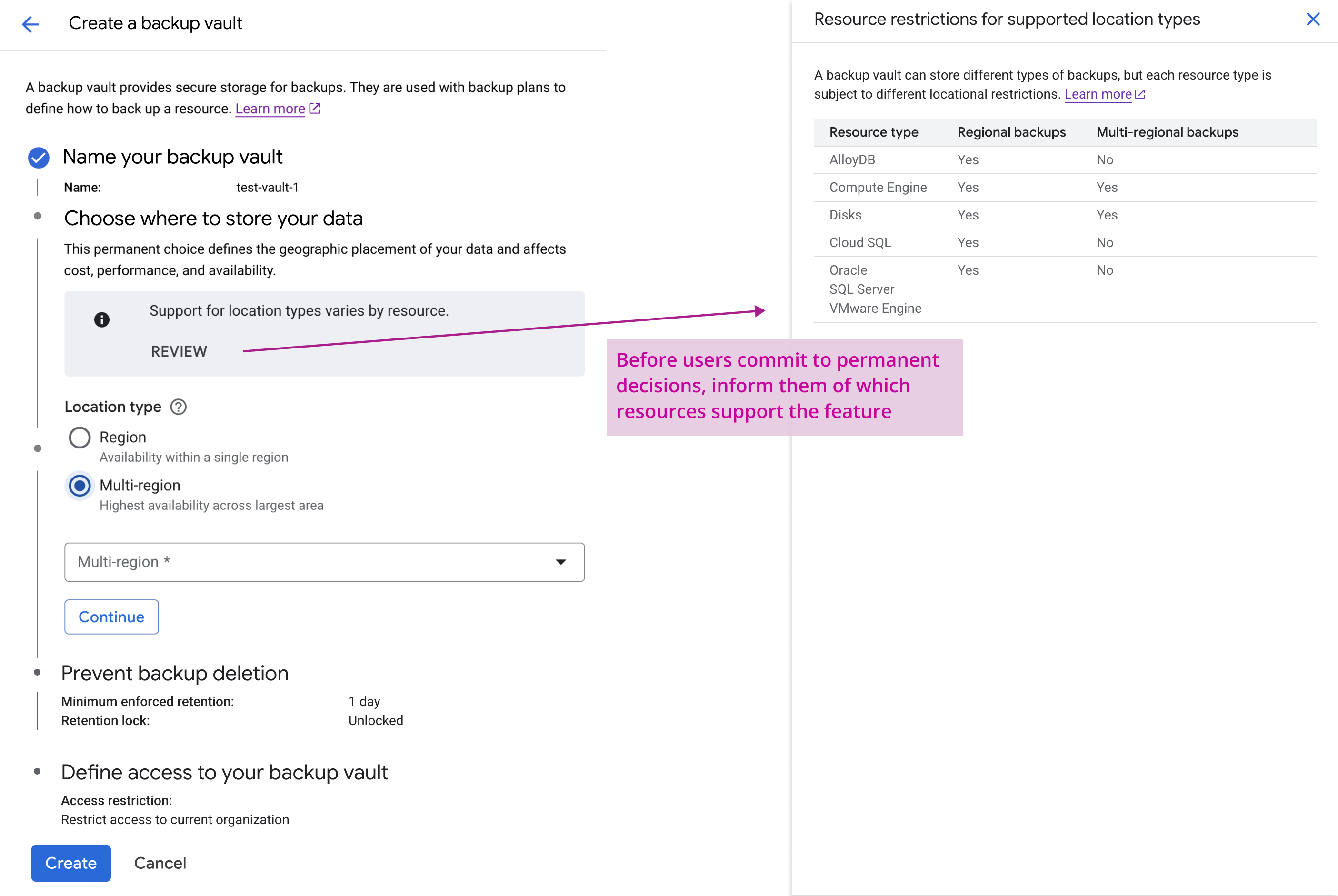
Another consideration was that not all resources can be backed up to multi-region backup storage. Users need visibility into which resources support multi-region backups during vault configuration to avoid compatibility issues.
UX Approach
To address these challenges, I adapted the Backup Vault MVP principles to address the specific challenges of multi-region support:
- Upfront visibility: Before making decisions during backup plan or backup vault configuration, users should be aware of limitations or requirements when using multi-region backup vaults.
- Simplify configuration choices: To maintain simplicity in a configuration flow, the system should keep options minimal, provide in-context guidance, and provide smart defaults when possible.
- Pricing transparency: Using multi-region backup storage incurs additional costs, and users should understand this before committing to decisions.
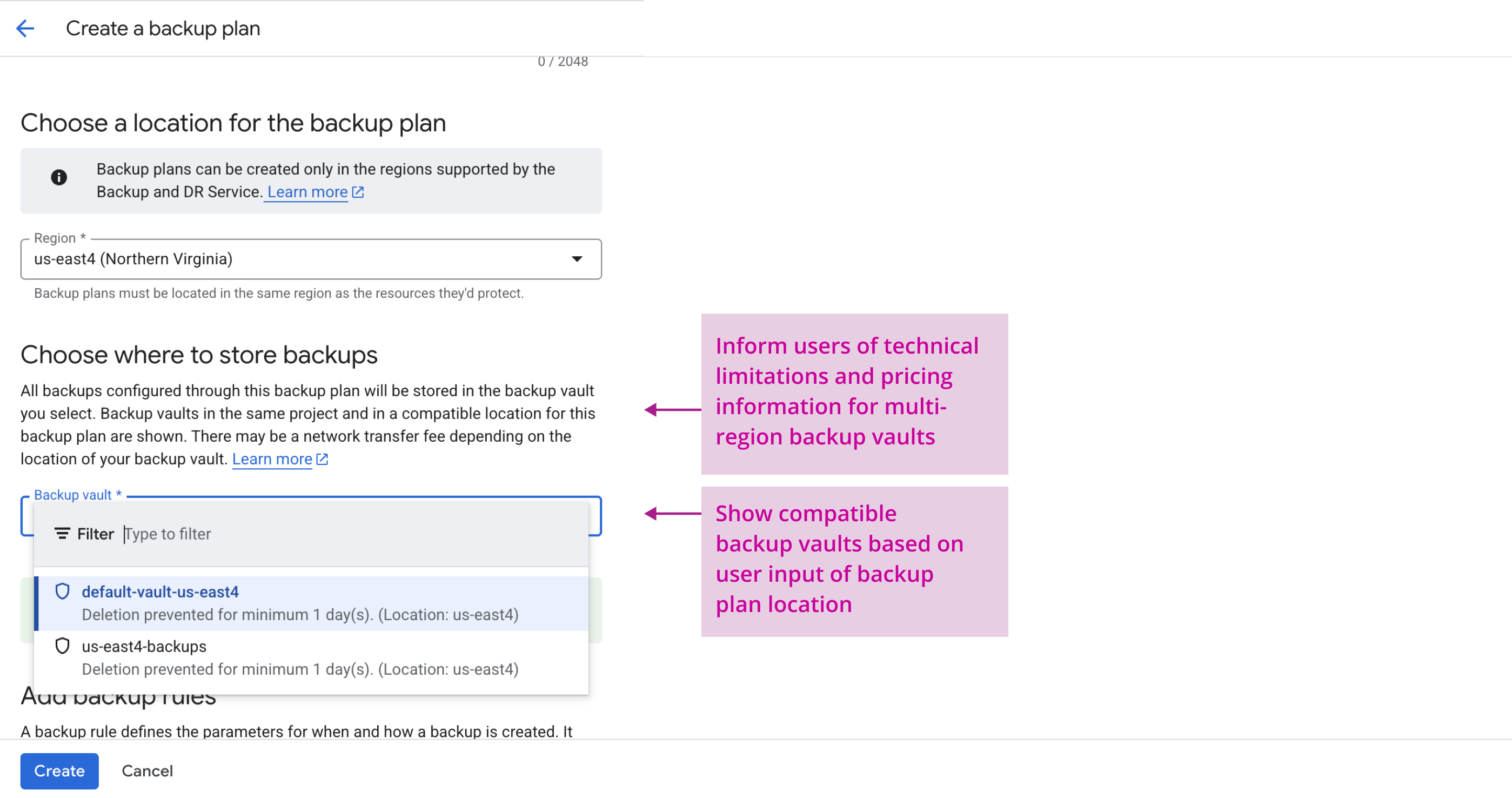
While Engineering and PM stakeholders agreed with the "smart filtered list" approach shown above as it reduces cognitive load for users by only showing valid choices and prevents configuration errors, during an Engineering review it was found to be technically infeasible due to limitations in the API design. I had to pivot this design due to the newly surfaced limitation, and worked closely with Engineering to find a solution that worked with the constraints.
Future enhancements
I proposed adding a dynamic pricing calculator to help users understand cost differences between regional and multi-regional storage. While stakeholders agreed this would add value, it was descoped due to timeline constraints. I documented this as a post-launch enhancement design recommendation.
Final design & rationale

Impact
Backup Vault launched for General Availability in just under a year, establishing GCBDR as a security-forward backup solution that meets compliance requirements. Following its launch, GCBDR saw significant year-over-year growth with Backup Vault cited as a key differentiator in customer feedback.
Multi-region support
Multi-region support Backup Vault successfully launched just 3 months after MVP launch. This major feature enhancement addressed the top customer feature request. Additional impact includes:
- Unblocking adoption for customers with disaster recovery and data compliance needs – particularly customers in regulated industries where data located across multiple areas is mandatory.
- Bringing feature parity with major competitors, since Google Cloud's backup solution now offers multi-region backup storage.
Takeaways
- A conditional disclosure approach can help users through complex decision-making. Rather than showing all configuration choices upfront, allowing input on fewer settings at a time can help users grasp the dependencies between inputs, as well as the potential impact of configuration choices – especially for choices that are irreversible.
- Get feedback early and often. Throughout the design process for MVP launch and feature enhancement launch, I prioritized getting feedback from users and stakeholders early on in my design process. This allowed me to detect areas of user friction and gauge technical feasibility before committing to a design decision that did not align. This also removed UX as a bottleneck during the project, and enabled the team to stay on track with timelines.
- Platform-wide consistency also accelerates understanding. While platform-wide consistency is beneficial for maintaining a unified design language, it also helps reduce the learning curve of a new product. Aligning CRUD operations for Backup Vault with established patterns from other GCP services (such as Google Cloud Storage) meant that users could lean on existing mental models.
